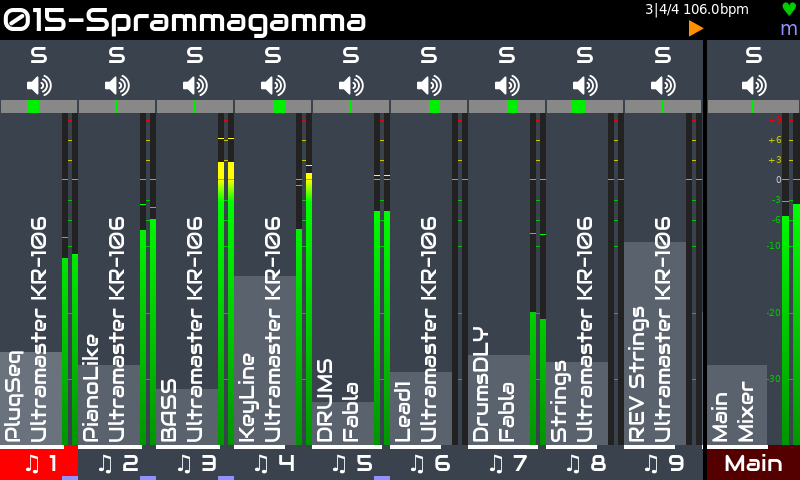
The mixer is the zynthian's root view. You can always access the mixer by pushing the MIX button. You can also push BACK until reaching it. From the launcher, you can access the mixer by pushing BACK. Similarly, from the mixer, you can access the launcher by pushing BACK. Mixer and Launcher are, indeed, a single view with 2 modes.
It's composed of vertical strips associated with chains. Initially it will be empty, showing the main strip alone. For each chain you create, a new strip is added to the mixer. There can be more mixer strips than can be displayed. They will scroll left / right if you select a strip that is off screen.
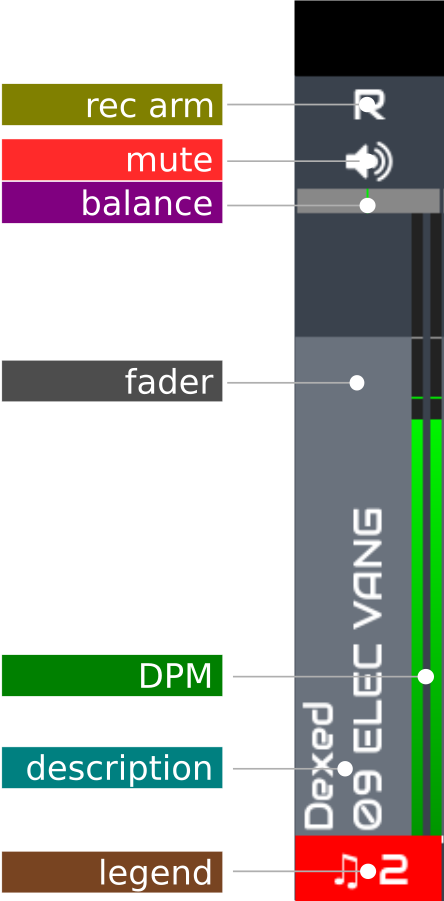
Each strip is an interactive widget that can be manipulated in several ways, showing status info about the associated chain. From top to bottom:
To create a new chain from the mixer view, simply short-push knob 3. If your zynthian hasn't knobs, you can use the "add chain" option from the main menu (short OPT).
The active chain is indicated by the legend at the bottom of the strip being highlighted red. You may change active chain by using the LEFT/RIGHT arrow buttons or rotating Knob 4. A thin strip at the bottom of the legend indicates the chain is active for MIDI input.
You can reorganize your columns (chains), moving any chain horizontally to the position you want. You can also dock the chains into the right side, sticked to the main chain.
If your zynthian has not knobs, please change to the launcher view (short BACK) for moving chains.