This introduction describes the core principles needed for using zynthian. It is essential that you understand these basic concepts.
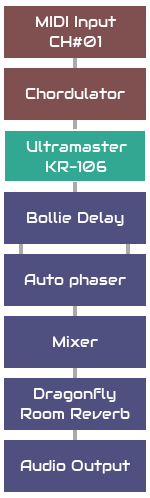
The fundamental building block of zynthian's sound architecture is the processor. A processor generates or manipulates audio and MIDI signals. Zynthian includes over 1000 processor engines to choose from, classified by type and category.
Processors are grouped together and interconnected within chains. Chains are a key concept in zynthian. The first thing you will do after powering-on your zynthian for first time is to create a chain and add some processors. Zynthian does little without any chains!
Processors may be positioned within the chain in series or in parallel. The quantity of chains or processors in each chain is only limited by available computing power.
By default, audio signals going out from chains feed a stereo mixer with typical mixer strip controls: fader, balance, mute, solo, phase reverse, etc. Audio processors may be positioned pre-fader or post-fader. Note that zynthian treats most audio as stereo. See mixer view for more details.
The audio and MIDI signals are routed between physical inputs, chain inputs, chain outputs, physical outputs and processor side-chain inputs. This provides a lot of flexibility whilst maintaining a simple, chain-based approach to signal routing. See chain manager for details.
There are five processor types:
Each type of processor is categorised to ease user selection. For instance, synth processors have categories: synth, sampler, piano, organ, acoustic & percussion. See engine selector for details.
Processors have parameters that may be controlled with zynthian knobs or mapped to MIDI CC messages. See chain control for details.
Processors may have presets that may be arranged in banks. See preset view for details.
You can create 8 types of chains:
Instrument and MIDI chains receive events from a configurable set of MIDI inputs. These MIDI inputs can be:
MIDI sources can be enabled for each chain separately. Each MIDI input can work in 2 different modes:
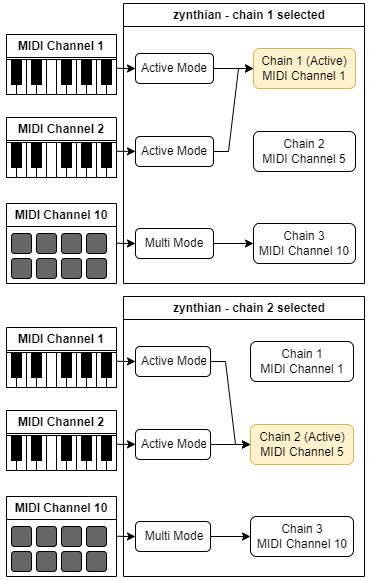
When a MIDI input is configured in active mode, the active chain receives all MIDI input from it and all MIDI events are translated to the active chain's MIDI channel. This is the default mode for all MIDI inputs. When using active mode you don't need to worry about the MIDI channel your keyboard or controller is using. You change which instruments are played by changing the active chain in your zynthian. See mixer view for details.
Active mode's behavior can be modified by the Active MIDI channel global flag. This may be enabled in the admin menu and has the following behaviour:
When a MIDI input is configured in multitimbral mode, only those chains matching the input's MIDI channel will receive events from this input. No MIDI channel translation is performed. Multitimbral mode allows receiving and managing each MIDI channel individually. Each MIDI input selects the chains it drives using the MIDI channel. If you are using an external sequencer or a MIDI controller that sends on multiple MIDI channels, you may want to use multitimbral mode.
A snapshot is the captured state of zynthian at the time of saving the snapshot. Snapshots are saved in a JSON file with .zss extension and can be loaded at any time, which effectively restores the state of the zynthian device when the snapshot was saved. Snapshots include:
Each time you overwrite an existing snapshot file, a backup copy is created. Backups can also be restored at any time, which can avoid much suffering. When you feel the panic, remember that zynthian stores the full save history for all snapshots!
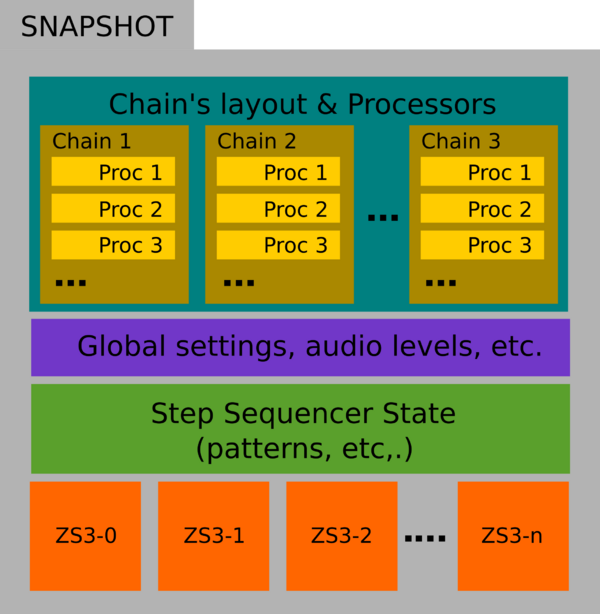
ZS3 means zynthian Sub-SnapShot. A ZS3 is a partial state that is stored in memory and can be recalled very fast. Each ZS3 can easily be associated (or learned) to MIDI Programs, i.e. program change events. Of course, every ZS3 is saved and restored within its snapshot. When a snapshot is first loaded, it uses the default sub-snapshot called, ZS3-0.
See ZS3 view to learn how to save and restore ZS3s with MIDI Program Change messages, manage ZS3s in stage and much more.
Each ZS3 includes:
The key concept to understand for ZS3 is that the chains layout is not stored in a ZS3, i.e. the chains layout is not modified when restoring a ZS3. You can't add or remove chains or processors by restoring a ZS3 because this is a slow operation and a ZS3 needs to be restored very fast. When loading a full snapshot, all the chains and processors are created. Later, when recalling a ZS3 within that snapshot, the chains layout will remain the same. Although a ZS3 can modify routing, splits, banks, presets, etc., the quantity of chains and processors will remain unchanged.